Use Next and Back, or click inside the course and use the arrow keys. Progress isn’t saved on this page. To keep your place and print a completion record, take the course on the Lab.
What the course covers
Act 01 · 3 lessons Getting oriented
A map of the course and the sixteen words you’ll hear most.
Show lessonsHide lessons
- 01Start here what the next twenty-one diagrams cover
- 02Words: the basics the eight words you'll hear most
- 03Words: the machinery the eight words for the machinery around the model
Act 02 · 6 lessons What the model is
How a chat becomes messages, tokens, and a fixed-size context window.
Show lessonsHide lessons
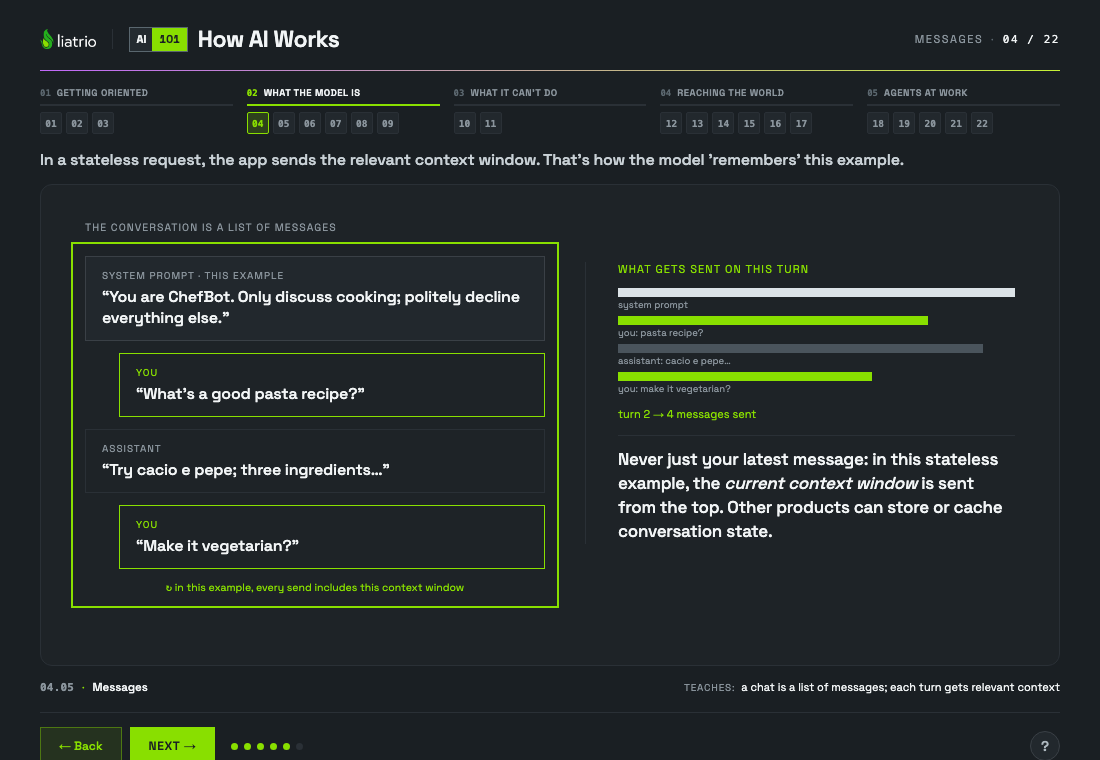
- 04Messages a chat is a list of messages; each turn gets relevant context
- 05Tokens tokens: the unit everything is counted in
- 06Context window the context window is a fixed box, and only what's in it exists
- 07Filling up your three options when the box fills up
- 08Writing it down how to keep what matters once the box starts forgetting
- 09The round trip where the model lives, and what it cannot reach
Act 03 · 2 lessons What it can't do
Why next-token prediction leads to invented facts and unreliable math.
Show lessonsHide lessons
- 10Prediction it predicts the next token, so it can invent things fluently
- 11Can it do math? Reliability vs. exact calculation reliability versus exact calculation, and why tools verify math
Act 04 · 6 lessons Reaching the world
How the harness, tools, skills, and retrieval reach what the model can’t.
Show lessonsHide lessons
- 12The harness the harness: the software doing everything the model doesn't
- 13Tool calls tool calls: how the model reaches the real world
- 14Tools vs skills vs plugins tools vs skills vs plugins; telling the three apart
- 15Skills are files what a skill actually is: a markdown file
- 16Who does the work how little of the work the model really does
- 17Your documents retrieval: how your own documents get into the window
Act 05 · 5 lessons Agents at work
What an agent is, how the loop runs, and the levers you control.
Show lessonsHide lessons
- 18What's an agent? what an “agent” actually is
- 19Sub-agents splitting a job into sub-tasks with configured context
- 20The loop one job followed all the way round the loop
- 21What you can influence important levers you can influence
- 22Recap the four ideas worth remembering
Read the whole course as text
01 · Start here
- What happens when you send a message to an AI, from your keyboard to the reply and back.
- Part one: messages, tokens, and the context window, and why it has no memory.
- Part two: it predicts the next token. That explains both the invented facts and failed calculations.
- Part three: it can't reach anything itself. Tools, documents, and the software that does the reaching.
- Part four: agents, the loop, splitting work up, and the levers you can influence.
02 · Words: the basics
- A quick glossary preview of the words you'll hear most: LLM and prompt (the generator, and what you send it).
- Token and conversation: how text is measured, and how a chat is stored.
- Context window and system prompt: what it can see, and who sets the rules.
- Hallucination and streaming: why it's confidently wrong, and why it looks like typing.
03 · Words: the machinery
- A preview of the machinery: the harness is the app around the model; a tool call is it asking that app to do something.
- Skills are written instructions; plugins and connectors can add tools, context, or reusable prompts. These are different things, often confused.
- An agent is a model in a loop; sub-tasks are the pieces of a job, which sub-agents can take on.
- And two habits: retrieval, for getting your documents in, and persistent artifacts, for keeping what matters.
04 · Messages
- This example starts with a system prompt: product-supplied instructions that set the AI's behavior.
- Your message gets added to the list, labeled as coming from you.
- The model's reply is appended too; same list, different label.
- Each new turn just adds to the list. A chat is nothing more than this growing list.
- In a stateless request, the app sends the relevant context window. That's how the model 'remembers' this example.
05 · Tokens
- Models don't read letters or words; text is first chopped into pieces called tokens.
- Tokens are model-specific chunks: whole words, word parts, punctuation, characters, or bytes.
- Each token maps to a number; that's what the model actually processes.
- Rule of thumb: a token is about 4 characters. Pricing and limits are all counted in tokens.
- And not all text costs the same; code and raw tool output can use more tokens than plain prose.
06 · Context window
- The context window is the model's working memory; a fixed-size box measured in tokens.
- The system prompt and conversation history take up space inside it. Only what's in the box gets sent.
- As the chat grows, the box fills up.
- Past the limit the oldest fall out in this harness: still on your machine, no longer sent.
07 · Filling up
- Long chats fill the window, and a nearly-full window is slow, expensive, and easy to distract.
- Option 1: trim. Drop the oldest messages. Free and automatic, but early detail is gone for good.
- Option 2: compact the old part by having the model summarize it and keep only the summary.
- Option 3: start fresh. Open a new chat and paste back only the bits worth carrying over.
- Either way the lesson is the same: a small clean window beats a big cluttered one.
08 · Writing it down
- The window is temporary by design; you've seen it trim itself.
- A decision from 30 turns ago can vanish; for the model, it never happened.
- So anything that matters goes outside it: a file, a spec, a commit, a ticket.
- So “write the spec first” works: it survives every trim and defines done.
- Rule of thumb: if losing it would hurt, it belongs in a file, not in the chat.
09 · The round trip
- Long before you showed up: a crawl of the web, then months of training.
- What it produced is the deployed model: fixed weights for this request, after pretraining and post-training.
- Now your turn: this stateless example sends a copy of the relevant context window. That's all it sees for this request.
- It reads all of it, then streams back one token at a time. Then forgets the conversation ever happened.
- Notice what's missing: no internet, no files, no idea what today is.
10 · Prediction
- Under the hood, learned weights score possible next tokens from the current context.
- At runtime, those scores form a probability distribution over possible next tokens.
- It picks a likely one, appends it, and repeats. That's the process.
- A hallucination isn't a separate bug in this process. It is one possible outcome when an unusual question or cluttered window still leads the scoring to pick a winner.
- A model can say 'I don't know,' but it does not reliably know when to abstain. Tools and source documents help.
11 · Can it do math? Reliability vs. exact calculation
- Ask it 1 + 1 and it says 2. A correct answer does not prove reliable arithmetic.
- For a large calculation, generated digits can be plausible but wrong.
- Use a calculator tool and let the model read the exact result.
- Rule of thumb: it can solve many math problems, but use a calculator or code tool and verify exact work.
12 · The harness
- Here's the thing nobody tells beginners: the model is a small part of what you're using.
- The model sits outside it entirely; reachable only by sending text across.
- The list, the token budget, trimming, tools, the loop, streaming: all harness.
- So the same model feels different in two products; usually a harness limit.
- It also means the forgetting is a choice someone made in software, not a mystery of the model.
13 · Tool calls
- Two sides to keep straight: your computer on the left, the model in a datacenter on the right.
- You ask something the model can't possibly know, like today's date.
- Rather than guess, the model sends back a request: 'run get_current_time() for me'.
- In this client-executed example, your computer runs the tool and fetches real data. The model receives the result.
- The result becomes context, and now the model can answer with current data.
14 · Tools vs skills vs plugins
- A tool is a capability the harness has; a tool call is the model asking for it and reading the result.
- A skill is written instructions, often with supporting resources: a playbook for a kind of work. It guides, but it doesn't add permissions.
- A plugin or connector is plumbing: switch it on and it may expose tools, context, or reusable prompts.
- Skills teach, plugins add, and tool calls do. None of them change the model itself.
- Every product names these differently, so ask which of the three someone means.
15 · Skills are files
- Here's an actual skill. It starts with a Markdown instruction file and can include supporting resources.
- It has no training or new permissions. The host decides how and when to load it into context.
- A skill is a workflow your team can read, run, and improve.
- So the barrier here isn't technical: if you can brief a new colleague on how the job gets done, you can already write a skill.
16 · Who does the work
- In this client-executed example, your side keeps the login and exposes a tool called
list_events. - When it wants your calendar, the model emits a structured tool-call request.
- Your computer signs in, calls the service, retries on failure, and cuts 200 events down to tomorrow's six.
- Those six lines return as a tool result, and the model reads them as context.
- A failure can be in the integration, its permissions or data, the tool contract, or the model's request.
17 · Your documents
- A 300-page policy may be too big to send at once, so it is often searched instead.
- A harness may search it for selected passages, or the model may call a search tool: “cracked screen coverage”.
- The selected passages become context next to your question. The search can run again if the first pass missed.
- This is a common retrieval pattern, not the only way to add document context.
- In this example, the answer is not learned during this session. The model reads retrieved text at runtime.
18 · What's an agent?
- A plain reply is generated from the current context and learned patterns in a single pass. It can't tell you that it never went and looked.
- An agent is that same model in a loop: look, act, check, repeat.
- The model still touches nothing itself. It emits a request, the harness does the acting, and the result comes back as more text.
- The
checkis what the loop buys you: it can catch its own mistake and go round again, and it pays for that in tokens every time. - A chat usually waits for you between steps. An agent can pick its next step within configured limits until it finishes, hits a limit, needs approval, or is stopped.
19 · Sub-agents
- Some jobs won't fit in one window; researching a 300-page report, for example. This is the lead agent: the one you're talking to.
- It splits the job into sub-tasks and sends each one down as a short brief. Each helper gets its own configured context.
- They work in parallel, and they burn through real volume; tens of thousands of tokens each.
- But watch what climbs back up: a couple of lines each. The raw pages never enter the lead's window.
- So the lead never reads all 300 pages. It answers from three short summaries, and its own window stays small.
20 · The loop
- Turn 1 starts on your side. Nothing exists yet but the system prompt and the question you just typed.
- This stateless example sends the conversation context now; other APIs can store or reuse conversation state.
- It didn't keep the date it asked for. The only reason it still knows is that the result now sits in the list on your side.
- The same turn can cross a second time with the tool result. An unchanged prefix may be reused from cache.
- Only now does an answer come back: one question from you, two crossings, about 350 tokens in this example.
- Turn 2 uses the conversation context again. Cost depends on the provider, cache, and new input and output.
21 · What you can influence
- Your prompt is your briefing: the goal, the constraints, and what “done” looks like. Leave one out and it may invent it.
- Skills are written playbooks, pulled in when relevant so you don't re-explain.
- And you choose the model: fast and cheap for bulk work, strong reasoning for the tricky call; you can switch partway through.
- The catch when you switch: a different model reads the same window differently, so keep the plan and decisions explicit.
- These are important levers. You can also control the tools, approvals, guardrails, budgets, and cancellation behavior around the model.
22 · Recap
- Four ideas carry the whole thing. First: a chat is a list of messages, and each turn gets the relevant context.
- Second: that list lives in a fixed box measured in tokens. Only what's inside exists.
- Third: the model just predicts the next token. That can produce invented facts and failed calculations.
- Fourth: everything else is ordinary software running a loop around the box, fetching things on its behalf.
- Put together: a frozen text predictor, handed a list in a box, run in a loop by software that does the fetching.
Have a suggestion or found a bug? Open a GitHub issue (GitHub sign-in required) and include the lesson and step number shown under the course, such as 05.02.